Building packages
Prerequisistes
Luet currently supports Docker and Img as backends to build packages. Both of them can be used and switched in runtime with the --backend option, so either one of them must be present in the host system.
Docker
Docker is the (less) experimental Luet engine supported. Be sure to have Docker installed and the daemon running. The user running luet commands needs the corresponding permissions to run the docker executable, and to connect to a docker daemon. The only feature needed by the daemon is the ability to build images, so it fully supports remote daemon as well (this can be specified with the DOCKER_HOST environment variable, that is respected by luet)
Img
Luet supports Img. To use it, simply install it in your system, and while running luet build, you can switch the backend by providing it as a parameter: luet build --backend img. For small packages it is particularly powerful, as it doesn’t require any docker daemon running in the host.
Building packages on Kubernetes
Luet and img can be used together to orchestrate package builds also on kubernetes. There is available an experimental Kubernetes CRD for Luet which allows to build packages seamelessly in Kubernetes and push package artifacts to an S3 Compatible object storage (e.g. Minio).
Building packages
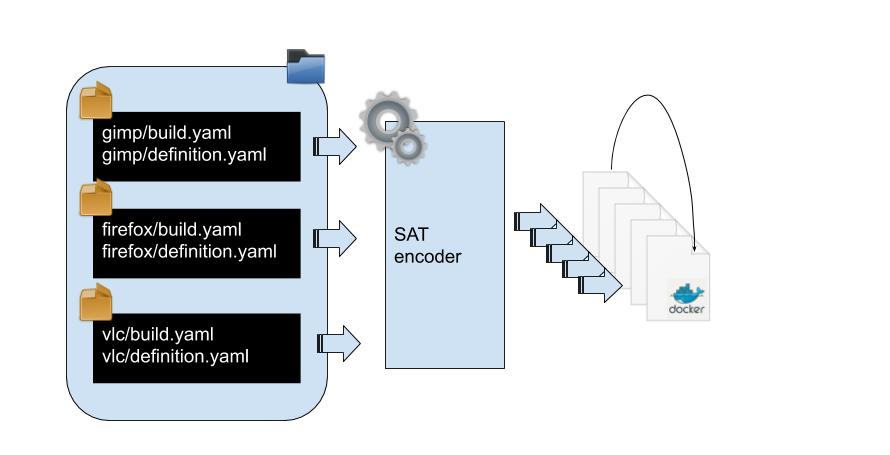
Luet provides an abstraction layer on top of the container image layer to make the package a first class construct. A package definition and all its dependencies are translated by Luet to Dockerfiles which can then be built anywhere that docker runs.
To resolve the dependency tree Luet uses a SAT solver and no database. It is responsible for calculating the dependencies of a package and to prevent conflicts. The Luet core is still young, but it has a comprehensive test suite that we use to validate any future changes.
Building a package with Luet requires only a definition. This definition can be self-contained and be only composed of one specfile, or a group of them, forming a Luet tree. For more complex use-cases, see collections.
Run luet build --help to get more help for each parameter.
Build accepts a list of packages to build, which syntax is in the category/name-version notation. See also specfile documentation page to see how to express packages from the CLI.
Environmental variables
Luet builds passes its environment variable at the engine which is called during build, so for example the environment variable DOCKER_HOST or DOCKER_BUILDKIT can be setted.
Every argument from the CLI can be setted via environment variable too with a LUET_ prefix, for instance the flag --clean, can be setted via environment with LUET_CLEAN, --privileged can be enabled with LUET_PRIVILEGED and so on.
Supported compression format
At the moment, luet can compress packages and tree with zstd and gzip. For example:
luet build --compression zstd ...
Will output package compressed in the zstd format.
See the --help of create-repo and build to learn all the available options.
Example
A package definition is composed of a build.yaml and a sibiling definition.yaml.
In the following example, we are creating a dummy package (bar/foo). Which ships one file only, /foo
$> # put yourself in some workdir

$~/workdir> mkdir package

$~/workdir> cat <<EOF > package/build.yaml
image: busybox
steps:
- echo "foo=bar" > /foo
EOF

$~/workdir> cat <<EOF > package/definition.yaml
name: "foo"
version: "0.1"
category: "bar"
EOF
To build it, simply run luet build bar/foo or luet build --all to build all the packages in the current directory:
$> luet build --all

📦  Selecting  foo 0.1
📦  Compiling foo version 0.1 .... ☕
🐋  Downloading image luet/cache-foo-bar-0.1-builder
🐋  Downloading image luet/cache-foo-bar-0.1
📦   foo Generating 🐋  definition for builder image from busybox
🐋  Building image luet/cache-foo-bar-0.1-builder
🐋  Building image luet/cache-foo-bar-0.1-builder done
 Sending build context to Docker daemon  4.096kB
 ...
Luet “trees” are just a group of specfiles, in the above example, our tree was the current directory. You can also specify a directory with the --tree option. Luet doesn’t enforce any tree layout, so they can be nested at any level. The only rule of thumb is that a build.yaml file needs to have either a definition.yaml or a collection.yaml file next to it.
Nesting dependencies
In the example above we have created a package from a delta. Luet by default creates packages by analyzing the differences between the generated containers, and extracts the differences as archive, the resulting files then are compressed and can be consumed later on by luet install.
Luet can create packages from different building strategies: by delta, by taking a whole container content, or by considering a single directory in the build container.
Besides that, a package can reference a strict dependency on others.
Example
Let’s extend the above example with two packages which depends on it during the build phase.
$~/workdir> mkdir package2

$~/workdir> cat <<EOF > package2/build.yaml
requires:
- name: "foo"
  category: "bar"
  version: ">=0"

steps:
- source /foo && echo "$foo" > /bar
EOF

$~/workdir> cat <<EOF > package2/definition.yaml
name: "ineedfoo"
version: "0.1"
category: "bar"
EOF


$~/workdir> mkdir package3

$~/workdir> cat <<EOF > package3/build.yaml
requires:
- name: "foo"
  category: "bar"
  version: ">=0"
- name: "ineedfoo"
  category: "bar"
  version: ">=0"

steps:
- source /foo && echo "$foo" > /ineedboth
- cat /bar > /bar

EOF

$~/workdir> cat <<EOF > package3/definition.yaml
name: "ineedfooandbar"
version: "0.1"
category: "bar"
EOF
To build, run again:
$> luet build --all
As we can see, now Luet generated 3 packages, bar/foo, bar/ineedfoo and bar/ineedfooandbar. They aren’t doing anything special than just shipping text files, this is an illustrative example on how build requirements can be combined to form new packages:
bar/ineedfooandbar depends on both bar/ineedfoo and bar/foo during build-time, while bar/foo uses a docker image as a build base.
See the package definition documentation page for more details on how to instruct the Luet compiler to build packages with different strategies.
Caching docker images
Luet can push and pull the docker images that are being generated during the build process. A tree is represented by a single docker image, and each package can have one or more tags attached to it.
To push automatically docker images that are built, use the --push option, to pull, use the --pull option. An image repository can be specified with --image-repository flag, and can include also the remote registries where the images are pushed to.
Luet doesn’t handle login to registries, so that has to be handled separately with docker login or img login before the build process starts.
Build faster
When packages are cached, for iterating locally it’s particularly useful to jump straight to the image that you want to build. You can use --only-target-package to jump directly to the image you are interested in. Luet will take care of checking if the images are present in the remote registry, and would build them if any of those are missing.
Notes
- All the files which are next to a
build.yamlare copied in the container which is running your build, so they are always accessible during build time. - If you notice errors about disk space, mind to set the
TMPDIRenv variable to a different folder. By default luet respects the O.S. default (which in the majority of system is/tmp).
Feedback
Was this page helpful?
Glad to hear it! Please tell us how we can improve.
Sorry to hear that. Please tell us how we can improve.